How to Use Instagram Trial Reels to Test Content on Non-Followers (2026)
Every creator knows the sinking feeling: you post a Reel you worked hard on, it flops, and all your followers watch it happen in real time. Instagram has a built-in answer to that problem, and most creators still are not using it. Trial Reels let you show a Reel to people who do not follow you first, read the performance data, and only then decide whether it deserves a place on your profile.
It is the closest thing Instagram has ever offered to A/B testing, and it has been available since late 2024. Here is how it works, who can use it, and how to turn it into a genuine growth advantage.
What Are Instagram Trial Reels?
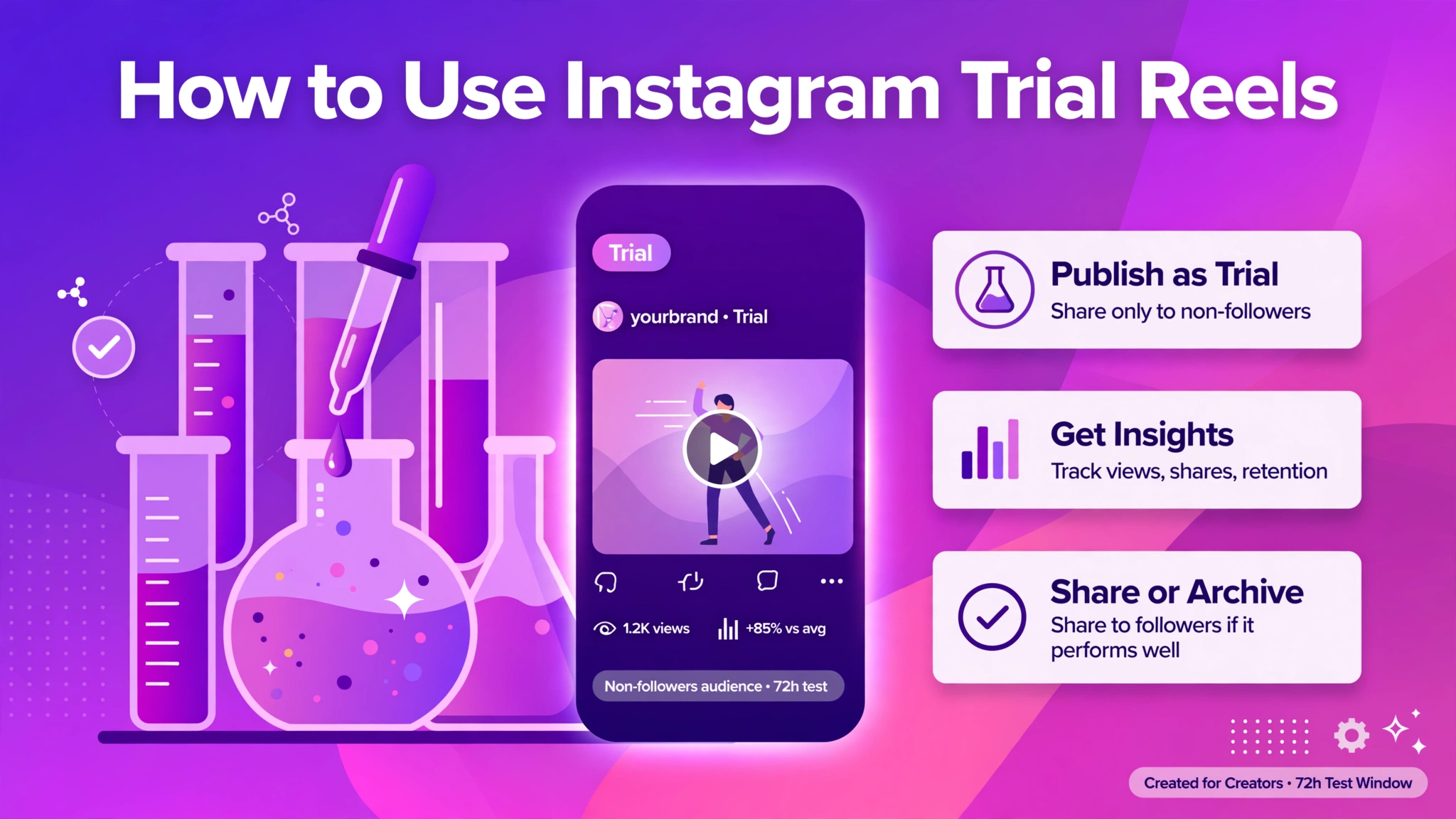
A Trial Reel is a normal Instagram Reel with one difference in distribution. When you post it as a trial, Instagram’s recommendation system shows it only to non-followers — it does not appear on your profile grid, in your followers’ feeds, or on your Reels tab.
The idea comes straight from Meta Platforms‘ creator playbook: let people experiment with new hooks, formats, or niches on a cold audience without risking the goodwill of the audience that already trusts them. After roughly 24 to 72 hours, Instagram shows you the results — views, likes, comments, shares — and you choose one of three paths:
- Share to everyone: the Reel goes public, lands on your grid and Reels tab, and can now reach your followers.
- Keep it as a trial: it stays invisible to followers indefinitely.
- Archive or delete it: no one was the wiser.
Crucially, Instagram says trial Reels are evaluated independently in ranking, so a weak trial does not drag down the performance of your regular Reels. That design choice is what makes them safe to experiment with.
Who Can Use Trial Reels? (Eligibility in 2026)
Trial Reels are not available to everyone. Per Instagram’s Help Center, you need:
- A public account — private accounts cannot access the feature.
- A professional account (Creator or Business) with at least 200 followers, or a personal public account with at least 1,000 followers.
- Eligibility to appear in recommendations. This is the one people miss: if Instagram has limited your account under its Recommendation Guidelines, you lose access to trials. Check Settings > Account > Account Status to confirm you are clear.
If the Trial toggle does not appear when you are about to post, the usual culprits are a private account, too few followers, an app that needs updating, or a temporary restriction after posting many trials in a short window (Instagram caps trials at roughly 20 per day).
How to Post a Trial Reel: Step by Step
- Create a brand-new Reel. Record or upload a fresh video and edit it in the Instagram app or in Edits, Meta’s companion editing app. Do not re-upload a Reel that is already on your profile — Instagram’s own guidance warns that re-used content may get limited reach in trials.
- Tap “Trial” before sharing. On the final screen before you publish, toggle the Trial option on.
- Choose automatic sharing (optional). You can enable “Share to everyone automatically”, which lets Instagram publish the Reel publicly if it performs well soon after posting, based on signals like views and engagement. It stays on for future trials until you turn it off.
- Tap Next, then Share. That is it — since April 2026, you can also schedule trial Reels like any other post.
- Read the insights after ~24 hours. Open your Reels tab, tap “Drafts and trial reels”, and review views, likes, comments, shares, and average watch time. Compare trial-to-trial, not trial-to-regular, because trials miss the initial boost from your existing followers and almost always get less reach.
- Decide: share or shelve. If the numbers justify it, share the trial to everyone from the insights screen. Shared Reels appear on your grid and Reels tab and can now reach your followers.
One Honest Caveat Before You Start
Adam Mosseri, the head of Instagram, has confirmed that Trial Reels almost always get less reach than regular Reels. That is by design: trials skip the warm-start phase where your existing followers engage early and signal to the algorithm that the content is worth pushing further.
This is not a flaw — it is the price of a clean test. A trial tells you whether cold viewers (who have no loyalty to you) find the content engaging. If a Reel earns watch time and shares from strangers, it is very likely to perform with your own audience too. Judge trials against other trials, and you will get a reliable read on your creative ideas.
A Simple Trial Reel Strategy That Actually Works
Trials are a tool, not a rule. Use them where the stakes are highest:
1. Test hooks before you commit
The first three seconds decide whether a Reel gets watched. Post two or three trial versions of the same idea with different openings — a question, a bold claim, a cold open — and let non-followers pick the winner.
2. Explore a new niche safely
Considering a content pivot — say, from fitness tips to meal prep? Run trials first. If the new topic flops with cold viewers, your followers never had to see you stumble.
3. Warm up new accounts
For accounts under a few thousand followers, trials are a way to reach non-followers without paying for promotion. Pair them with consistent posting and a clear niche, and they become a free discovery channel.
4. Build a creative backlog
Keep your best-performing trials saved. When you hit a creative dry spell, you already have a folder of audience-validated ideas to polish and publish for real.
What not to do: do not run every single post as a trial. If you are already struggling to post consistently, the extra friction will slow you down. Save trials for product launches, bold creative departures, and ideas you might put ad spend behind.
How Trial Reels Fit the Instagram Algorithm in 2026
Instagram’s ranking in 2026 leans heavily on “sends per reach” — how often viewers DM your Reel to someone else. That behaviour concentrates in evening downtime, which is exactly when most trial Reels get their test audience. A trial that earns sends from strangers is signalling the single strongest ranking factor in the system.
Trial Reels also connect to a bigger theme: the Instagram algorithm increasingly rewards content that performs with non-followers, because that is where growth comes from. Features like the Explore page, the Reels tab, and hashtags all exist to push content beyond your follower base. Trials are simply the most controlled way to measure that non-follower appeal.
If you want to understand what the algorithm is responding to, our guide on IGTools for Instagram walks through the tools that help you track performance, engagement rate, and audience behaviour across your account.
FAQ
What are Trial Reels on Instagram?
Trial Reels are Reels that Instagram shows only to people who do not follow you, keeping them off your profile grid and out of your followers’ feeds until you choose to share them publicly. They are a way to test new content ideas on a cold audience without risking your existing reach.
How many followers do I need to use Trial Reels?
Instagram’s Help Center states that public professional accounts (Creator or Business) need at least 200 followers, while public personal accounts need at least 1,000. Your account must also be eligible to appear in recommendations — check Account Status in your settings.
Do Trial Reels hurt my account or my other Reels?
No. Instagram states that Trial Reels are evaluated independently in its ranking system, so a weak trial will not reduce the reach of your standard Reels. They also typically take longer to accumulate views because they are shown to non-followers.
Can my followers ever see my Trial Reel?
Not during the test. A trial Reel will not appear in your followers’ feeds or on your profile grid unless you share it to everyone. In the very rare case that a non-follower shares it with someone who follows you, they could encounter it that way — but that is uncommon.
Why don’t I have the Trial Reels option?
The most common reasons are a private account, too few followers, a restriction on recommendations (check Account Status), an outdated app, or the feature simply not having reached your account or region yet. The toggle only appears when you post a new Reel.
The Bottom Line
Trial Reels turn every risky creative idea into a low-stakes experiment. The setup takes seconds, the data arrives within a day, and a failed trial costs you nothing but a few minutes of editing. In a 2026 feed where non-follower discovery drives growth, testing on strangers before you perform for your audience is one of the smartest habits a creator can build.
Start with one trial a week. Test a hook, a format, or a topic you have been unsure about — then let the data decide what your followers get to see.