IG Tools: Complete Guide to Instagram Tools and Features
Instagram has grown from a simple photo-sharing app into one of the most powerful marketing and personal-branding platforms in the world, with more than two billion monthly active users. Managing an account on that scale — posting consistently, tracking performance, researching hashtags, engaging followers — is a full-time job. That is exactly why IG tools exist: third-party and built-in utilities designed to help Instagram users work smarter, grow faster, and understand their audience better.
In this complete guide, we break down what IG tools are, the main categories available, how they work behind the scenes, the real benefits and risks of using them, and how to choose the right ones for your goals in 2026.
What Are IG Tools?
“IG tools” is a broad umbrella term for any software, website, or app that extends what you can do on Instagram beyond the platform’s built-in features. The term is most commonly associated with third-party web apps like IGTools.net and similar services, but it also covers legitimate utilities: analytics dashboards, content schedulers, hashtag generators, follower trackers, and photo editors.
Broadly speaking, IG tools fall into two groups. Official tools work through the Instagram Graph API provided by Meta Platforms — they are authorized, safe, and include features like the Professional Dashboard, Insights, and Meta Business Suite. Unofficial tools operate outside that API, sometimes by asking for your login credentials or by simulating app behavior. These are the tools that carry real risk, and we will cover that in detail below.
Main Categories of Instagram Tools
Not all IG tools do the same thing. Here are the main categories you will encounter:
Follower and Engagement Tools
This is the most searched-for category. Follower tools claim to increase your follower count, while engagement tools promise more likes, comments, story views, or Reels plays. They typically work through “exchange” systems — you follow or like other users’ content to earn credits, which you then spend on your own account — or through direct (often fake) delivery. Quality varies wildly, and many violate Instagram’s Terms of Use.
Analytics and Insights Tools
Analytics tools show who follows and unfollows you, which posts perform best, when your audience is online, and what your engagement rate is. Instagram’s own Insights covers the basics for creator and business accounts, while advanced dashboards add competitor tracking, historical data, and follower-quality analysis.
Content Creation and Editing Tools
These include photo editors, video trimmers, caption generators, and template libraries for Stories and Reels. Strong visuals are the foundation of Instagram growth, so creation tools are arguably the most valuable — and safest — category of IG tools.
Hashtag and Keyword Tools
Hashtag generators suggest relevant tags based on your photo or caption, while research tools estimate how competitive a hashtag is. In 2026, Instagram also treats captions and keywords more like search, so SEO-style tools that optimize your profile and captions for Instagram search are increasingly useful.
Scheduling and Management Tools
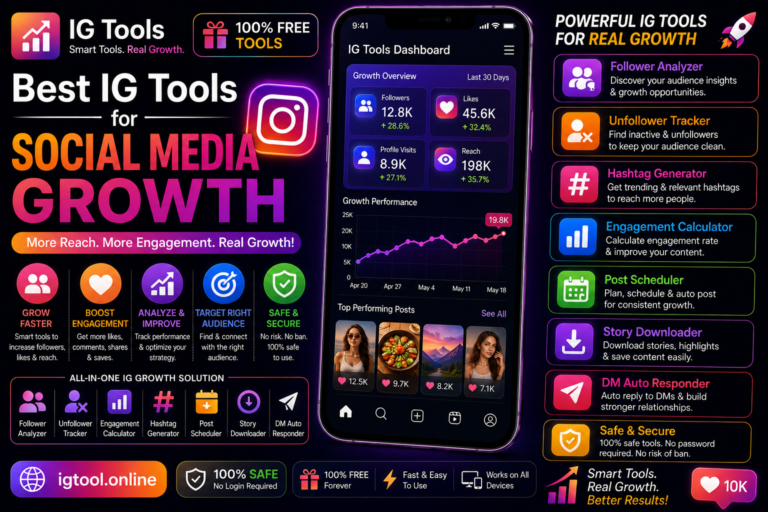
Scheduling tools let you plan posts, Stories, and Reels in advance and publish them automatically at peak times. Multi-account management dashboards are especially useful for agencies, creators with several profiles, and small businesses. We compare the leading options in our guide to the best IG tools for Instagram growth and engagement.
How Instagram Tools Work Behind the Scenes
Understanding the mechanics helps you judge whether a tool is safe. Legitimate tools connect through Meta’s official Instagram Graph API: you authorize them with an OAuth login (you never hand over your password directly), they receive a scoped token, and they can only access the data you permitted. This is how Meta Business Suite, Hootsuite, Buffer, and similar services operate.
Unofficial tools take shortcuts. Some ask you to log in with your Instagram username and password on their own website — a major red flag, since you are handing account control to strangers. Others use automation that mimics human taps and swipes (botting), which Instagram’s systems detect through behavioral patterns, device fingerprints, and rate limits. When Instagram detects this activity, the consequences range from temporary action blocks to permanent account bans.
Benefits of Using IG Tools
- Time savings: Scheduling a week of content in one sitting frees up hours of daily manual posting.
- Better decisions: Analytics tools reveal which content formats your audience actually responds to, so you stop guessing.
- Consistent branding: Template and editing tools keep your grid, Stories, and Reels visually cohesive.
- Competitive insight: Tracking competitor growth and top-performing posts helps you spot trends early.
- Audience understanding: Knowing when followers are online and what they engage with improves your content strategy.
Risks and Safety Considerations
This is the part many “IG tools” websites gloss over, so let us be direct:
- Terms-of-Service violations: Instagram’s Terms of Use and Community Guidelines prohibit inauthentic behavior, including buying followers, likes, or engagement, and using automation to interact with the platform. Tools that do these things can get your account restricted or banned.
- Account security: Any tool that asks for your Instagram password outside of Instagram’s own login screen is a phishing risk. Never share your password with a third-party site.
- Fake engagement damage: Bot followers and purchased likes destroy your engagement rate, which is the metric the Instagram algorithm actually uses to decide how widely to distribute your content. A smaller, real audience outperforms a large fake one every time.
- Data privacy: Shady tools may harvest your email, phone number, or contacts. Check what permissions a tool requests before connecting it.
A simple rule of thumb: if a tool promises instant followers or guaranteed viral reach for free, treat it with extreme skepticism. Real growth tools help you create better content and understand data — they do not manufacture popularity.
How to Choose the Right IG Tool
Before signing up for any IG tool, run through this checklist:
- Check the login method. Safe tools use Instagram’s official OAuth authorization. If it asks you to type your Instagram password into its own website, walk away.
- Read recent reviews. Look for independent reviews, not testimonials on the tool’s own site. Search for complaints about hacked accounts or bans.
- Verify the business. Legitimate tools have a real company behind them — an about page, contact details, and a privacy policy.
- Match the tool to your goal. Do not pay for a follower-exchange tool when what you actually need is a scheduler or an analytics dashboard. Our best free IG tools roundup can help you compare zero-cost options first.
- Test with a secondary account. If you want to experiment with an unfamiliar tool, never connect your main account first.
Best Practices for Using Instagram Tools Safely
Even with legitimate tools, a few habits keep your account secure: enable two-factor authentication on Instagram; regularly review “Apps and Websites” in your Instagram settings and revoke access you no longer use; avoid running multiple automation tools simultaneously, which looks suspicious to Instagram’s systems; and keep your content strategy human — tools should support your creativity, not replace genuine engagement with your audience. Pair your toolkit with a documented Instagram growth strategy so every tool serves a clear goal.

Frequently Asked Questions
What are IG tools used for?
IG tools are used for growing followers, increasing engagement, tracking analytics, scheduling posts, researching hashtags, and creating content. The safest and most valuable ones focus on content creation, scheduling, and analytics rather than artificial growth.
Are IG tools safe to use?
Official tools that connect through Meta’s Instagram Graph API are safe. Unofficial tools that ask for your password or use automation can lead to hacked accounts, action blocks, or permanent bans. Always check how a tool connects before using it.
Do IG tools really give free followers?
Some claim to, but “free followers” from third-party tools are typically low-quality, inactive, or bot accounts. They do not engage with your content and can damage your engagement rate and account standing. Organic growth strategies deliver real followers who interact.
Can Instagram ban my account for using IG tools?
Yes. Instagram’s Terms of Use prohibit inauthentic behavior and unauthorized automation. Accounts caught using bot services or engagement pods can face temporary restrictions or permanent disablement.
What is the best free IG tool for beginners?
Start with Instagram’s own free tools: the Professional Dashboard and Insights for analytics, and Meta Business Suite for scheduling. Pair them with a free hashtag research tool and a solid photo editor, and you have a complete starter toolkit without spending anything.